Important Documents: How to Protect and Back Them Up
Which essential documents to protect, how to store them physically and digitally, and how to find them fast in an emergency.
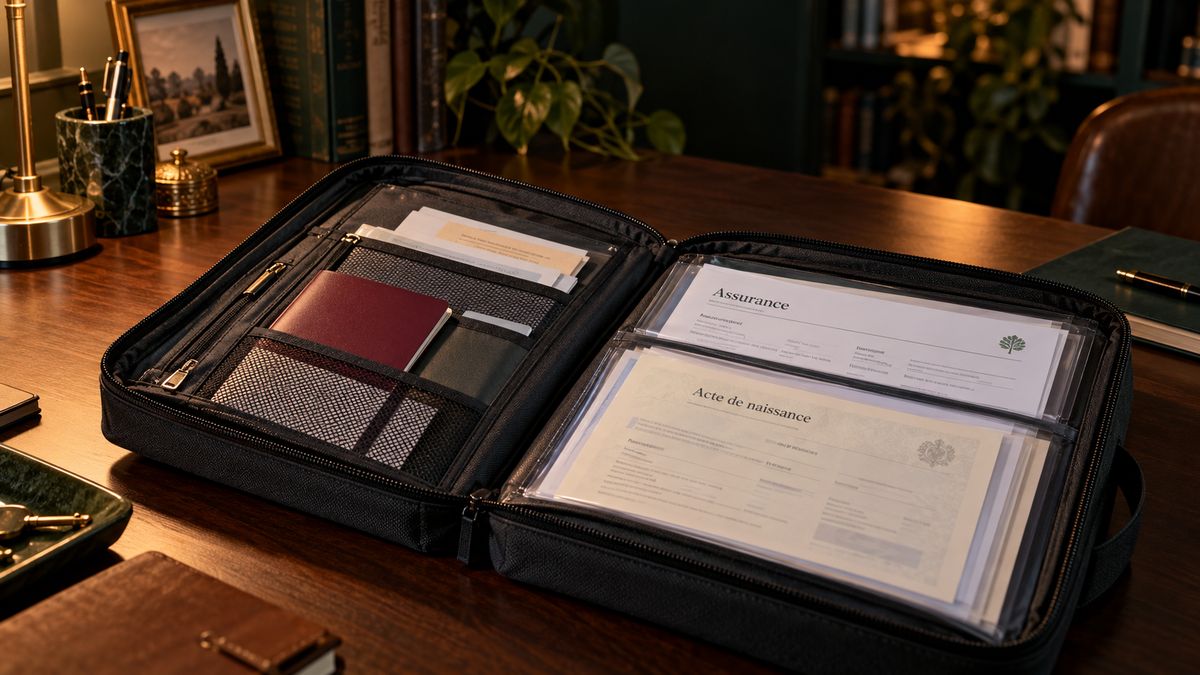
After a natural disaster, house fire, or forced evacuation, one of the most difficult and time-consuming problems survivors face is reconstructing their document trail. Insurance claims require proof of ownership. FEMA assistance requires proof of residency. School enrollment requires birth certificates. Financial accounts require ID.
The families who navigate post-disaster bureaucracy most effectively are those who prepared their documents before anything happened. This guide tells you exactly what to protect, how to store it, and how to access it fast under stress.
The Master Document List
These are the documents every American household should have protected and accessible:
Identity and Status
- Passports — Valid or expired; keep all of them
- Birth certificates — Every family member
- Social Security cards — Store separately from other documents; don’t carry in wallet
- Naturalization certificates / Green cards (if applicable)
- Adoption papers (if applicable)
- Marriage certificate
- Divorce decree (if applicable)
- Military discharge papers (DD-214) (if applicable)
Financial and Legal
- Property deed — If you own your home
- Mortgage documents — Including loan number and servicer contact
- Vehicle titles
- Wills and trusts — Keep copies at home; originals with your attorney
- Power of attorney documents
- Healthcare directives / living will
- Life insurance policies — Including policy numbers and insurer contact
- Other insurance policies — Home, auto, health (policy numbers and contact info)
- Recent tax returns — Last 2–3 years
- Social Security cards (mentioned above — extremely sensitive, store separately)
Medical
- Health insurance cards — Members of every insurance you carry
- Vaccination records — Especially for children (required for school enrollment)
- Medication lists — Current medications, doses, prescribing doctors for everyone
- Allergy information — Especially drug allergies and severity
- Blood types — For all family members
- Recent medical records — Especially for chronic conditions or ongoing treatment
- Pet vaccination records — Required by shelters and boarding facilities
Housing and Utilities
- Lease or rental agreement — Proof of residency for FEMA and insurance claims
- Recent utility bills — Proof of residency and account numbers
- Homeowner’s or renter’s insurance declarations page — The one-page summary of your coverage
Financial Accounts
- Bank account numbers and customer service contacts — For your primary accounts
- Investment account numbers (but not passwords)
- Recent pay stubs — Proof of income for assistance programs
Storage System: Three-Layer Protection
The goal is redundancy. If you lose one copy, you have another.
Layer 1: Fireproof/Waterproof Home Safe
A quality fireproof safe protects your documents from fire (rated to 1,200°F for 30+ minutes) and flooding. It stays in your home for quick access.
What goes in the safe:
- Passports
- Birth certificates (certified copies)
- Marriage/divorce certificates
- Vehicle titles
- Insurance policies and declarations
- Copies of wills/power of attorney (originals stay with attorney)
- Recent tax returns
- Vaccination records
- Medication lists
What to look for in a safe: UL 72 fire rating, waterproof rating, weight above 50 lbs (lighter safes can be carried out by a burglar), electronic or key lock. The SentrySafe SFW123GDC is a popular and reliable option around $100–200.
What NOT to put in a home safe: Social Security cards (too often needed for daily use; risk of being inside a damaged home), financial account passwords, or anything you need daily.
Layer 2: Bank Safe Deposit Box
For the absolute most irreplaceable documents:
- Original property deed
- Original will (keep copy at home and with attorney)
- Naturalization certificates
- Irreplaceable family documents (original family photos, historical records)
Annual fee: $25–75 at most banks. Completely worth it for peace of mind.
Important note: Only you and designated joint holders can access a safe deposit box. If you’re incapacitated, your family may face legal hurdles. Ensure your will and healthcare directive allow another trusted person access, or add them as a joint holder.
Layer 3: Encrypted Digital Backup
This is your access-from-anywhere layer — available even if your home is completely destroyed.
What to scan:
- Everything in your fireproof safe (at minimum)
- Both sides of driver’s licenses and health insurance cards
- Important contracts and leases
- Vehicle titles
How to do it:
- Use a scanner app on your phone (Adobe Scan, Microsoft Lens, Genius Scan) — these produce clean, readable PDFs
- Create a folder in your cloud storage labeled something non-obvious (e.g., “Project Archives” rather than “Emergency Documents”)
- Enable two-factor authentication on your cloud account
- Consider using Proton Drive for automatic encryption
What NOT to scan to cloud: Social Security numbers (write them down on paper kept in your fireproof safe, never digitally), financial account numbers, card numbers, passwords.
The Emergency Document Folder: Grab and Go
Separate from your complete document storage, keep a lightweight packet of the most critical documents you might need to leave with on short notice.
Contents:
- Copies of all passports or driver’s licenses (not originals)
- Copy of insurance policies (or just the declarations pages)
- Medication list for every family member
- Emergency contacts list (printed — don’t rely on your phone)
- Important account numbers (bank, insurance — not passwords)
- Copies of vaccination records for children
Keep this in a waterproof bag or Ziploc in a designated spot everyone knows about. It should take under 2 minutes to grab on the way out the door.
Document Reconstruction: When Everything Is Lost
If a disaster destroys your documents before you could save them, here’s what to do:
Identity documents:
- Birth certificates: Vital Records office of the state you were born in. Available at VitalChek.com or through each state’s website.
- Passports: US State Department (travel.state.gov). Expedited replacement available for active travel needs.
- Social Security card: ssa.gov or your local Social Security office. Free replacement.
- Driver’s license: Your state’s DMV — requires ID documents to replace, which is why having at least one backup form of ID is critical.
Financial documents:
- Bank and investment account statements: Request directly from institutions. FEMA disasters trigger special assistance processes.
- Tax returns: IRS Get Transcript service (irs.gov/individuals/get-transcript). Free online access to tax records.
Property documents:
- Deed: County recorder’s office. Deeds are public records and can be obtained for $5–25.
- Vehicle titles: Your state’s DMV.
FEMA tip: After a presidentially declared disaster, FEMA provides specific guidance for document replacement and may simplify some processes. Register at disasterassistance.gov immediately after a declared disaster.
Annual Document Check
Set a calendar reminder once a year to:
- Check passport expiration dates (renew if less than 6 months before next planned travel)
- Update medication lists with any changes
- Update contact information in your emergency folder
- Verify your fireproof safe documents are still current
- Ensure your cloud backups are synced and accessible
30 minutes once a year keeps your document system current and functional when you actually need it.
Related guides:
More in this category

Rejoindre la communauté
Recevoir nos guides chaque semaine
Des conseils pratiques, des retours terrain, les meilleures ressources — directement dans votre boîte mail.
Rejoindre le Refuge →